Why Microsoft 365 Storage is a Governance Problem | ENow

Most organizations discover they have a Microsoft 365 storage problem in one of two ways....



You cannot claim a saving you cannot decompose.
The storage figure in your admin center appears as a single number. It is an aggregate of at least seven components with different owners and different remedies: content people are using, version history nobody has looked at, copies held by a compliance control working exactly as designed, and sites whose owner left two years ago. Treated as one number, it produces one answer: reduce it. Broken down, it produces a set of decisions with named owners. That is slower, and it is the better approach that holds.
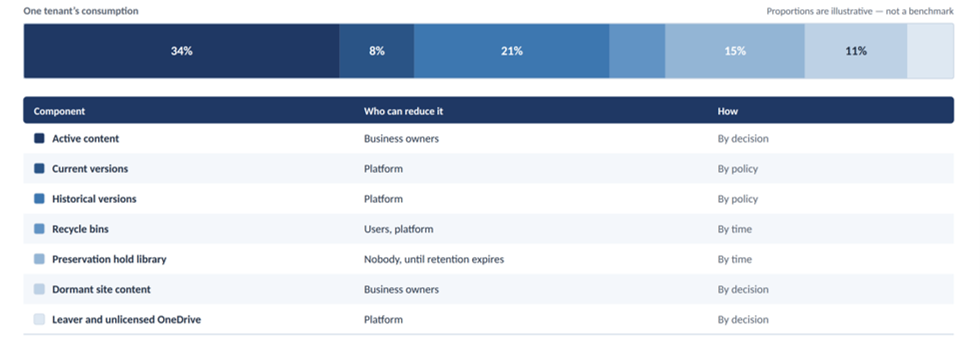
Figure 1. Anatomy of a terabyte. Proportions are illustrative, not a benchmark.
Part 1 of this series covered why storage became a line item in the budget. This post is about knowing what you have: a SharePoint storage breakdown, OneDrive included.
| Component | Counts toward quota? | Who can reduce it? |
|---|---|---|
| Active content | Yes | Business owners |
| Version history | Yes | Platform, through version limits and a separate trim operation |
| Site Recycle Bin (First-stage Recycle Bin) | Yes | Users and Platform |
| Site Collection Recycle Bin (Second-stage Recycle Bin) | Microsoft's own pages disagree; validate in your tenant | Platform |
| Preservation hold library | Yes, in the site's quota | Nobody, until retention expires |
| Archived sites | Counted as archived rather than active storage | Platform |
| Unlicensed OneDrive | Administered and billed separately | Platform, with urgency (see below) |
Two rows in that table are less settled than they look. Microsoft's documentation is inconsistent on whether second-stage recycle bin content counts toward quota. The statement that the preservation hold library counts towards the site's quota appears on a Purview page rather than any SharePoint storage page, and there is no native report of its size across an estate. Measure both in your own tenant rather than reasoning from documentation.
One detail about recycle bins catches experienced administrators out. Deleted items are kept for 93 days from the original deletion, and that window is shared across both stages. Emptying the first-stage bin moves content into the second stage for whatever time remains. It does not reclaim anything sooner. Purging the second stage does, but that turns a recoverable deletion into a permanent one, and it should be treated as a deletion decision rather than housekeeping.
Every Microsoft 365 Group creates a Site. Every Team creates a Site. And every private channel and every shared channel creates its own separate SharePoint site, with its own storage, version history, recycle bins, and potential preservation hold library. A Team with thirty private channels is thirty-one sites.
End users create these channel sites through a Teams interface that never mentions SharePoint and has no approval step. In most tenants, they are the most common cause of unexplained growth in both site count and storage. If your provisioning standard governs Team creation, it governs the first site. It does not reach the thirty that follow.
Users generate SharePoint and OneDrive storage all day without ever going near SharePoint.
Governance applied only at site level misses most of this.
Leaver accounts are the familiar problem. When a user is removed, their OneDrive is kept for a configurable period (30 days by default) and then sits in the recycle bin for a further 93 days before permanent deletion. That is a window of about four months, and most organizations do nothing with it. The reclamation opportunity is real, but the bigger risk runs the other way: content the organization needs, in a leaver's OneDrive, with a deletion date nobody is tracking.
Unlicensed accounts are the newer and more urgent problem. They become read-only after 60 unlicensed days and are archived at 93. Since 1 July 2026 they have been subject to a cumulative 365-day nonpayment clock, and accounts that were already unlicensed before that date carry deletion risk from 1 July 2027. Most organizations, of any age, have a backlog. Find out what is in them, and whether any of it is under a retention obligation, before the clock decides for you.
There is a second trap. Reactivating a single archived unlicensed account switches on the monthly storage meter for every unlicensed account in the organization, not only the one you reactivated. Reassigning a license to the user reactivates on a different footing. Understand the difference before anyone presses the button as a favor.
Of the three ROT categories, trivial content (drafts, screenshots, downloads, installers) is usually the largest and least examined. No single file is worth a decision, so nobody makes one. That is why it needs a policy rather than a review.
You do not need a product to start. You need one page with seven numbers on it.
Quick answer: how do you break down Microsoft 365 storage?
Collect seven data points: total consumption against entitlement, consumption by site, active content versus version history, recycle bin and preservation hold volumes, site counts by type, leaver and unlicensed OneDrive accounts, and workload-generated content such as Teams recordings and Copilot Pages. Then start tracking monthly growth.
Two habits make that page useful rather than interesting.
Review the few, automate the many. In almost every tenant, a small number of sites, often dozens rather than hundreds, hold most of the volume. Those can be reviewed individually and given an owner and a decision. The thousands of sites holding the remainder are a policy problem, handled by lifecycle controls rather than by people looking at them.
Classify, including what you cannot classify. Put every site into one of six segments: active, dormant, orphaned, obsolete, regulated, or unknown. Only two of those are candidates for reduction without further work, and neither is the largest. The unknown segment is usually far bigger than anyone expects. That count is your real backlog.
Finally, start collecting monthly consumption today, even if you do nothing else with it. Consumption tells you about last year. Growth rate tells you about next year, and it is the number an executive should see. You cannot create history after the fact. When you forecast your Microsoft 365 storage growth, separate steady-state growth from event-driven growth such as migrations, acquisitions, litigation holds, or the Copilot rollout. A straight line fitted through a migration produces a forecast that never materializes.
Microsoft 365 Storage Governance
Find the M365 storage nobody owns
Six findings in ENow's free 365Gov Score highlight the scope of the orphaned and unlicensed portion of your M365 tenant that is using storage for which no one is typically accountable. Sign up to get an overview of Unlicensed OneDrive Accounts, OneDrive Owners, SharePoint Sites Without Site Owners, Microsoft Teams Without Owners, Microsoft Teams That Are Empty, and Microsoft Teams Private Channels.
Then request a demo to see how ENow 365 Governance Accelerator surfaces the exact workspaces, users, and content driving up your storage bill.
Yes. Every saved version counts against the site's quota. Version limits stop future growth, but existing versions stay until you run a separate trim operation, so set the limit and schedule the trim together.
The first-stage recycle bin does. For the second stage, Microsoft's own pages have conflicting information and special notes that Web items (subsites) go straight to the second-stage Recycle Bin and count towards your storage, so measure it in your tenant. Deleted items are kept for 93 days from the original deletion across both stages, and emptying the first stage does not free space any sooner.
Yes. Microsoft's Purview documentation says it counts in the site's quota. Nobody can reduce it until retention expires, and there is no native report of its size across your estate, so you have to measure it yourself.
Yes. Each private or shared channel gets its own SharePoint site with its own storage and recycle bins. A team with thirty private channels is thirty-one sites, and users create them in Teams with no approval step.
They become read-only after 60 unlicensed days and are archived at 93 days. Since July 1, 2026 a cumulative 365-day nonpayment clock applies, and accounts unlicensed before that date carry deletion risk from 1 July 2027. Check them for retention obligations before then.
By default, 30 days after the user is removed (the period is configurable), then another 93 days in the recycle bin. That gives you about four months to recover content the business still needs.
Copilot Pages and Notebooks sit in a user-owned SharePoint Embedded container shared with Loop. They count toward your tenant storage quota and cannot be reported separately from Loop content.
Next in the series: four words that cost money. Why clean-up, retention, archiving and long-term data management are not interchangeable, and why your compliance program increases your storage bill.