Unblocking Your Microsoft 365 Copilot Rollout: How to Define Success and Drive Real ROI

Gartner’s research reveals a persistent “AI intention gap.” Each year from 2019 to 2024, roughly ...



“He tasks me. He tasks me and I shall have him! I'll chase him 'round the moons of Nibia and 'round the Antares Maelstrom and 'round perdition's flames before I give him up!
– Khan Noonien Singh- Star Trek II- The Wrath of Khan (paraphrased from Moby Dick).
A series from AI reality → tool clarity → execution → optimization
Reality check: What’s actually happening with AI in enterprises
Tool clarity: Understanding Copilot vs ChatGPT vs Teams Premium (you are here)
Execution: How to roll out Copilot successfully and prove ROI
Optimization: Choosing the right AI mix (Teams Premium vs Copilot) to scale value
Do you ever feel like Khan when you glance at your Windows 11 taskbar and see two different Copilot icons, plus one for ChatGPT? Those icons can feel confusing. In this post, we’ll clear up the differences between Windows 11 Copilot, Microsoft 365 Copilot, Copilot Chat, and Copilot Web, and answer whether you still need a separate ChatGPT subscription.
First, there are currently too many products branded as “Copilot.” Previously, names were tied to specific apps (e.g., Copilot in Teams, Word, or Sales). Today, Microsoft has shifted to a more unified “Copilot” brand, which can make things harder to track. And if you feel overwhelmed, I am with you.
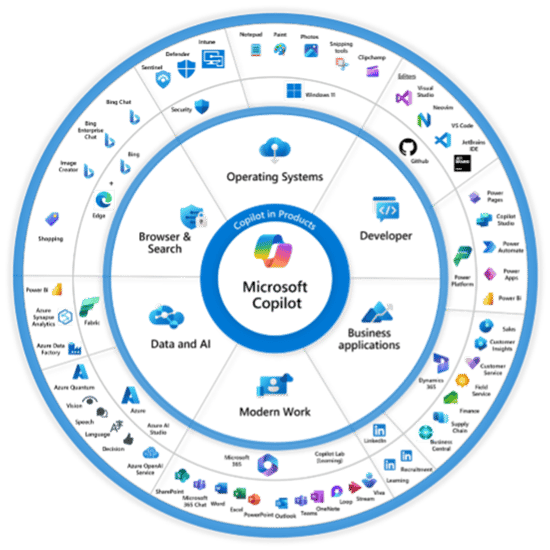
Second, just buying a “Copilot” license does not give you access to all the Copilots. There are extra costs involved with Copilot Studio, Copilot for Security, CRM Copilot, and more. We will cover that in a later blog. For right now, let us just focus on Windows 11 Copilot, M365 Copilot, and ChatGPT.
As we explored in The State of AI in 2025, many organizations are eager to adopt AI—but lack clarity around how enterprise AI actually works in practice.
There are two different plans for Windows 11 Copilot users, Standard and Pro. What is the difference?
Copilot Standard aka “Free Copilot.”
This is the easiest way for you to access ChatGPT, especially if you have a Copilot PC with a dedicated Copilot key.
With Standard, you get:
You should be aware that with the free version, prompts and responses may be logged and used to improve the underlying AI models. While connections are encrypted in transit, your data can be used for training unless you’re on a commercial Microsoft 365 tenant, where enterprise data is not used to train models.
Copilot Pro - $20 per month.
This is the faster and more powerful version of Copilot. The cost is $20 a month.
It includes:
So, could you replace a ChatGPT Plus subscription with Copilot Pro? In most cases, yes. Unless you’re a developer or advanced power user, Copilot Pro offers similar functionality. (To learn more about ChatGPT pricing, visit ChatGPT Pricing | OpenAI)
Now, this is where things get more interesting. With M365 Copilot, you have a few different ways to access it:
Copilot Web provides direct access to Microsoft’s hosted version of ChatGPT. It is encrypted and secure, and lets you choose which model (GPT-3.5 or GPT-4 or newer) to use.

This is now directly using ChatGPT for the latest information possible. That also means there is a possibility that you are finding information that others have not verified as being the best response (Up vote and Down vote- thumbs icons). Those checks and balances can take time to be proven as the best response. This is the same if you are using ChatGPT directly.
Copilot Chat works differently than all the other Copilots.
First, every Microsoft 365 tenant using Copilot has its own isolated instance where prompts and responses are processed through Microsoft’s secure architecture. Copilot uses the Azure OpenAI Service (not a separate LLM per tenant) combined with Microsoft Graph data to generate results. Its role is to take queries around your data, like email, Teams chats, Word, PowerPoint, and Excel documents. This is done by looking at and cataloging all your cloud content (OneDrive for Business, Exchange, SharePoint, as well as Teams discussions and chats and then break that down into its relationships.
Here is an example: You missed a meeting last week that was recorded by Copilot. In that meeting, a PowerPoint was shared, notes were taken, a meeting agenda was created, a calendar event was set, and video recordings and transcripts were made.
That information is all connected by Microsoft Graph. It works with the LLM that takes a question like “I missed the meeting last Thursday; can you recap the meeting for me?” and turns it into a query for the Graph. “Meeting, Thursday, Stephen, Shared Content, Calendar, People, Notes, Recordings, and anything else related to the meeting. It then brings that content together to create a concise response with Meeting Notes, @Mentions, Attendees, as well as Tasks and to whom they were assigned.
This same set of actions can be used to summarize long email threads, Teams conversations, or take a series of notes and turn them into a PowerPoint deck.
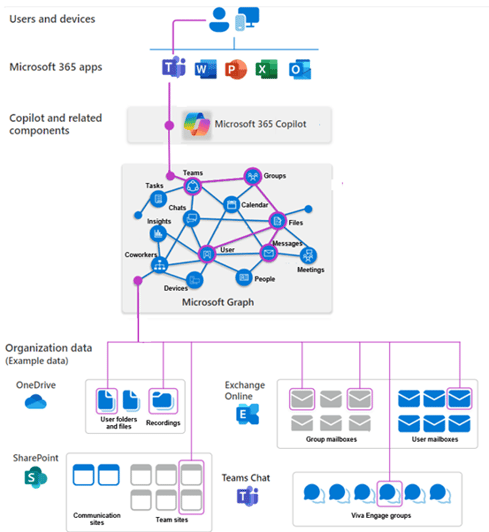
Since all the content Copilot has access to is in your tenant, it is secure, and only members of your tenant can see this. If you record a meeting and have external guests attend, they are unable to see the recap or ask questions about the meeting since they are outside of the secure boundary of your tenant. In addition, your tenant can be further secured via Hold Your Own Key (HYOK) or Bring Your Own Key (BYOK), as well as Geolocation, which allows your content to be stored in specific regions (Content created by UK employees stays within the EU) to meet regional requirements.
Finally, when it comes to content visibility, if you do not have access to content before Copilot, you will not have access now. But that brings up a whole issue with data hygiene and ROT (Redundant, Outdated, or Trivial) content. This is something we will cover in depth in a later blog, as this can be one of the key issues that can keep Copilot from providing accurate responses to your users.
Sounds awesome right? Best of both worlds. It is, but at a cost. Microsoft 365 Copilot is priced at $30 per user/month (annual commitment). Some organizations may see slight regional price differences. Yes, folks, that means each Copilot user must pay $360 to $430 per user each year. If you have 5,000 employees, that means your yearly cost, just for Copilot will be around $1.8 to $2 million per year.
NOTE: This is in addition to Office and Windows license cost. Copilot is a separate license. Also note: this does not include other specialized Copilot products (e.g., Copilot for Sales, Finance, Security, or Copilot Studio). Each of these requires additional licensing beyond your standard Microsoft 365 or Windows subscriptions.
Here is a breakdown of some of the Copilot requirements and costs:
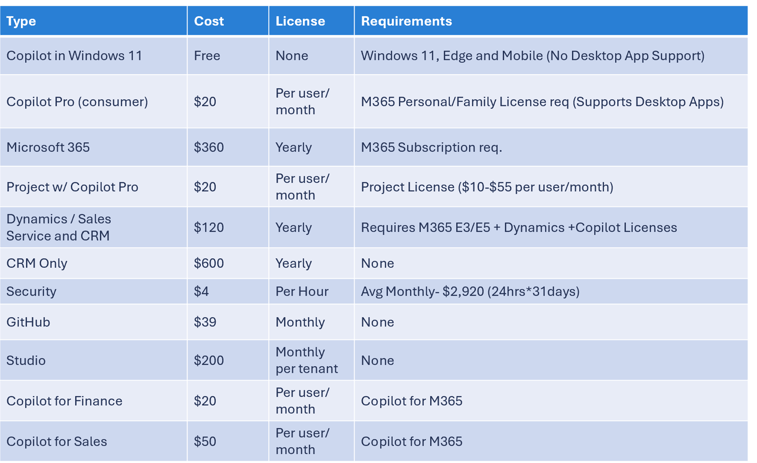
In today’s economic climate, it is hard to justify that kind of additional cost without the ability to show between 2 – 3 million dollars in ROI from Copilot each year to management.
So, how do you make sure your Copilot rollout is successful and that people actually adopt and integrate new ways of working by leveraging Copilot within their environment? It starts before you even roll out Copilot.
Even after choosing the right Copilot experience, many organizations still struggle with adoption because they haven’t defined what success looks like—or how to measure ROI.
Selecting the right Copilot or ChatGPT experience is only part of the journey. Without clear goals, metrics, and user alignment, even the best AI tools fall flat.
Up next: How to unblock your Microsoft 365 Copilot rollout by defining success, aligning stakeholders, and driving measurable ROI.
Don’t let confusing Copilot options, license costs, and governance risks derail your rollout. ENow’s True Adoption Center helps you measure real usage, adoption, and ROI across Microsoft 365 and Copilot, while Copilot Governance ensures secure, compliant sharing across SharePoint and OneDrive.
👉 See a Demo of True Adoption & Copilot Governance
Turn Copilot from an expensive experiment into a measurable business win.


Gartner’s research reveals a persistent “AI intention gap.” Each year from 2019 to 2024, roughly ...
