
Copilot Adoption Starts at the Top: A Leader's Playbook

Rolling out new technology like Microsoft 365 Copilot is exciting, but once the novelty wears off,...



"Changes are taking the pace I'm going through" – David Bowie, Changes
In this post, we will examine the foundational components of effective change management and why they are critical to successful Microsoft 365 and Copilot adoption.
In this post, we will cover:
Change Management should be a mandatory component of any technology project. Out of every post in this blog series, besides the ROT Data post, this one is the most important step to a successful Microsoft and Copilot adoption project.
Many of my clients either reduced its importance in their deployment or migration plan or, in some cases, didn't make change management a step in their process at all, and ultimately found that adoption of their new software or ways of working failed.
Far too often, people treat change management as a single step. It's not. It's a series of steps.
Remember, from a leadership perspective, change management success hinges on training, governance, and clear ROI messaging.
From an employee perspective, fears like privacy concerns, data accuracy, and lack of clarity on tool usage create barriers to adoption.
Start with data, not assumptions. No matter how many times management tells me about their users, how they react to change and such, I always cringe. It's not to say they don't understand their users in aggregate, but if I asked what the top issues and concerns are, they tend to stumble and provide specifics. So how do we get data to support this?
Before designing a migration or adoption plan, gather measurable data from leadership and team members.
Doing an envisioning session with leadership teams (I like to use a Miro board) is one of the easiest ways to do this. Envisioning will help to define:
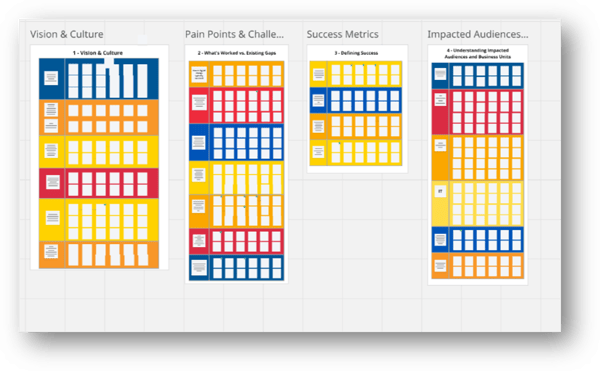
Once leadership perspectives are documented, gather input directly from team members. The best way to achieve this is a simple survey. I suggest no more than five questions that should take no more than five minutes to complete. Make sure to poll a variety of users and job roles.
For what it's worth, I am also not against bribing them to complete these surveys to gain a meaningful volume of data (it's a wonder what people will do for a T-shirt, stickers, socks, or a $25 gift card).
Summarize your top findings via bullet points. I also like adding a word cloud, as some people work better with a visual.
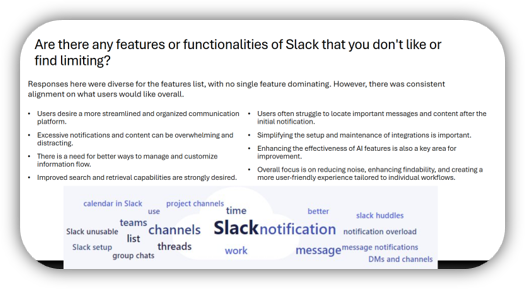
How do you measure change readiness before a Microsoft 365 migration or Copilot deployment?
To measure change readiness before a Microsoft 365 migration, run a leadership envisioning session to document the vision, business objectives, and past roadblocks. Then survey a cross-section of employees with five short questions about how they actually work. Compare the two. The gap between what leadership assumes and what employees do day to day is where adoption fails, and where your training and communication plan should focus.
Here's a real-world example of the perception and gaps I found post-survey. The scenario is a customer moving from SharePoint Server on premises to SharePoint Online. I knew before even sending out the survey what the issues were going to be, but as I have said before, you need data and details to validate and get to the root causes of potential blockers to adoption.
Here's a look into how my brain works:
These would all impact their future collaboration when moving to SharePoint Online.
So, we got the survey results back and here's what we saw:
In short, exactly what I expected. So I went to management and explained that for a good migration, we needed to take a step back: spend time teaching users how to use cloud files and Teams for collaboration, work with IT to turn off attachments and only allow links, and teach users how to use OneDrive for their personal files and then copy a version over to Teams that would now be "the one ring to rule them all." No more duplicate local copies of files.
A survey tells you what your users say they do. Usage data tells you what they actually do, and the gap between the two is where adoption stalls. That gap is exactly what ENow's True Adoption Center closes. Instead of guessing how your teams work, you see real usage across Teams, SharePoint, OneDrive, and Copilot, with a Copilot Readiness Score that shows who is primed for a license before you pay for one. If you want to start with data instead of assumptions, see how True Adoption Center measures adoption across your Microsoft 365 environment.
In the second part of this series, 'How to Overcome Employee Resistance to Change During Microsoft 365 & Copilot Adoption,' we will examine how organizational change affects team members directly, including:
We will also explore practical ways organizations can reduce uncertainty and improve long-term adoption outcomes.
Until then, thanks for reading.
Stephen
Change management is the structured work of preparing people for a new way of working, not just installing new software. In a Microsoft 365 or Copilot rollout it means understanding how your users work today, showing them clearly what changes, and supporting them through it. Skip it and adoption stalls, no matter how capable the technology is.
Copilot changes how people write, search, and make decisions, so the barrier is rarely the license. It is trust and habit. Employees worry about privacy, data accuracy, and whether they are using the tool correctly. Change management surfaces those concerns early and gives people a concrete reason to change how they work.
Start with data, not assumptions. Document leadership's vision in an envisioning session, then survey employees to see how they actually work. Use the gap between the two to build training and communication that targets real barriers. Secure visible leadership support before rollout, and plan for different learning styles.
The biggest is treating change management as a single step, usually a training session bolted on at the end. It is a series of steps that runs from planning through post-rollout. The second is assuming leadership already knows how employees work. They rarely have the specifics, which is exactly why you gather data first.
Poll a variety of users and job roles with a short survey, five questions or fewer, that takes under five minutes. Ask how they communicate, share files, and use their current tools. Summarize the findings, then compare them against leadership's assumptions. The gaps show you where to focus training before you migrate.
Adoption does not end at go-live. Reinforce new habits with ongoing communication, change champions inside each team, and metrics that track real usage rather than logins. Part Two of this series covers why resistance develops and how to keep momentum after the initial rollout.
For more Microsoft 365 and Copilot Change Management content, check out Tracy Van der Schyff's series, starting with, 'Why change management is the real Copilot.'