In part one of our series on change management for Microsoft 365 and Copilot adoption, we explored the essential components, highlighting practical strategies to ensure a smooth transition and successful adoption of new tools or processes.
- The importance of change management in deployment and migration projects
- Common pitfalls and misconceptions about the change management process
- Understanding user needs and addressing barriers to adoption
- Key steps for implementing a successful change management strategy.
- Tips for leadership and communication to drive positive outcomes.
In part two, we will share how change directly affects end users, often causing uncertainty and anxiety about job security, roles, and future success.
Specifically:
- How resistance can stem from lack of trust in leadership, poor communication, and fear of skill gaps or failure.
- How disruption of routines and exclusion from decision-making further contribute to employee disengagement.
- Why addressing these concerns thoughtfully improves acceptance and smooths the transition.
- Finally, the importance of ‘Change Champions’ as a key to successful deployment and adoption.
Why Do Employees Resist Change? Start by Understanding the Effect on Users
Before you implement any new processes, it’s important to understand the effect of change on end users.
What Are the Top 10 Reasons Employees Fear Change?
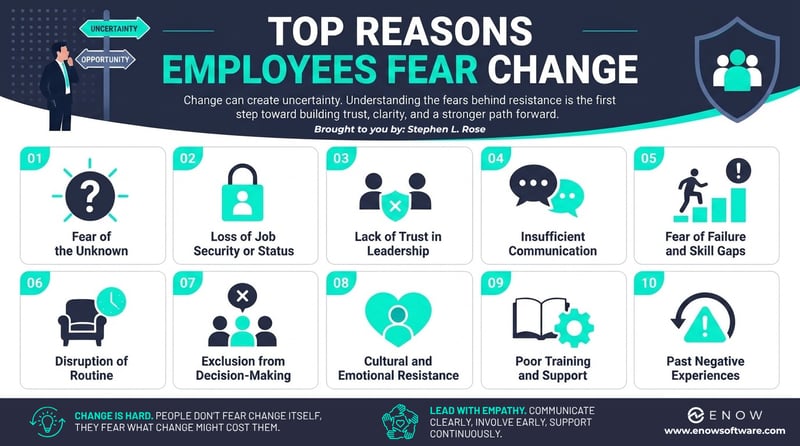
- Fear of the Unknown: Change introduces uncertainty: employees worry about what the future holds, how their roles will shift, and whether they’ll succeed in the new environment.
- Loss of Job Security or Status: Many fear that AI, automation, or new processes will make their roles redundant or diminish their influence within the organization.
- Lack of Trust in Leadership: If employees doubt leadership’s intentions or past promises, they’re less likely to embrace change. Poor transparency amplifies this resistance.
- Insufficient Communication: When the “why” behind the change isn’t clearly explained, employees feel disconnected and skeptical. They need clarity on benefits, impact, and overall plan or process expectations.
- Fear of Failure and Skill Gaps: Employees worry they won’t be able to master new tools or processes, leading to performance issues or embarrassment.
- Disruption of Routine and Comfort Zones: People prefer familiar workflows. New systems require relearning, which feels like extra mental effort and stress.
- Exclusion from Decision-Making: When employees aren’t involved in shaping the change, they feel powerless and disengaged.
- Cultural and Emotional Resistance: Organizational norms and personal habits create inertia. Emotional reactions like fear, anger, or grief often surface during major shifts.
- Poor Training and Support: Minimal onboarding or inadequate resources make new technology seem overwhelming, fueling confusion, frustration, and resistance.
- Past Negative Experiences: Previous failed rollouts or chaotic transitions breed skepticism and reluctance to engage with new initiatives.
With that said, think about how to best
- Build Trust and Transparency: Employees need clarity on why the change is happening and how it aligns with long-term goals. Transparent communication reduces uncertainty and builds confidence.
- Prepare and Support People: Change management is a people initiative before it’s a technical one. Tailor strategies to address emotional and practical concerns, not just technical implementation.
How to Reduce Resistance to Change: 8 Proven Leadership Strategies
- Communicate Early, Often, and Clearly
- Explain the reason for change, expected benefits, and risks of inaction.
- Use multiple channels (town halls, intranet, email, informal conversations) to reinforce messages.
- Highlight what will remain unchanged to reduce fear of losing stability.
- Engage Employees in the Process
- Involve employees in decision-making, pilots, and feedback loops.
- Create focus groups and champion networks (we will cover Change Champions later in this blog) to foster ownership.
- Provide Hands-On Training and Resources
- Offer hands-on training, practice environments, and self-service resources.
- Use “train-the-trainer” and white-glove sessions for leadership to build confidence.
- Address Emotional Concerns with Empathy
- Recognize that resistance often stems from fear, not defiance.
- Encourage open dialogue and validate concerns, don’t dismiss them.
- Show Quick Wins and Celebrate Milestones
- Demonstrate early benefits to build momentum and trust.
- Publicly recognize contributions and progress to reinforce positive behavior.
- Align Change with Organizational Goals
- Connect the change to strategic objectives and personal growth opportunities.
- Explain how the change supports job security and career development.
- Leverage ‘Change Champions’
- Identify influencers within teams to advocate for the change.
- Empower them with resources and recognition to drive adoption.
- Monitor and Adapt
- Use surveys, feedback sessions, and analytics to track user adoption and sentiment.
- Adjust strategies based on real-time feedback and resistance patterns.
Quick answer: How do you overcome employee resistance to change?
Communicate the “why” early and often, involve employees in the decisions, offer hands-on training, and answer fears with empathy instead of pressure. Celebrate quick wins and give change champions what they need to advocate peer-to-peer. Put most of your energy into the 70% who are open but hesitant, not the users who already love the change or never will.
The things that I have found to be the most successful in supporting these goals have been:
- Create Persona-led enablement and branded campaigns to make change relatable. This could be done by department, role or any other logical split that shows how it can benefit cohorts in different ways.
- Use tools like Viva Engage (previously Yammer), or a dedicated Microsoft Teams Channel to create an area for evergreen content (best practices, capability overviews) instead of static guides or email attachments that are hard to reference.
- Use governance and adoption analytics to measure ROI and adoption success.
- Use a risk mitigation checklist that management and IT can use. Here’s a version I use quite often below-
Change Management Risk Mitigation Checklist (7 Categories)
1. Communication Risks
- Define clear messaging on why the change is happening.
- Share benefits and expected outcomes early.
- Use multiple channels (email, town halls, intranet).
- Provide FAQs and open Q&A sessions.
2. Engagement Risks
- Involve employees in planning and pilot phases.
- Create feedback loops (surveys, focus groups).
- Identify and empower change champions.
3. Training & Capability Risks
- Develop role-based training plans.
- Offer hands-on workshops and self-service resources.
- Provide ongoing support (helpdesk, office hours).
4. Emotional & Cultural Risks
- Acknowledge fears and concerns openly.
- Encourage managers to have one-on-one conversations.
- Share success stories and quick wins.
5. Adoption & Performance Risks
6. Governance & Compliance Risks
- Ensure data security and privacy policies are clear.
- Communicate compliance requirements upfront.
- Assign accountability for governance.
7. Sustainability Risks
How to Apply the 15/70/15 Rule to a Microsoft 365 Rollout
For this part, I would like to share my 15/70/15 rule (patent pending). Let’s say you have 1000 employees and 90 days to help them migrate and adopt. Every company has three categories of users.
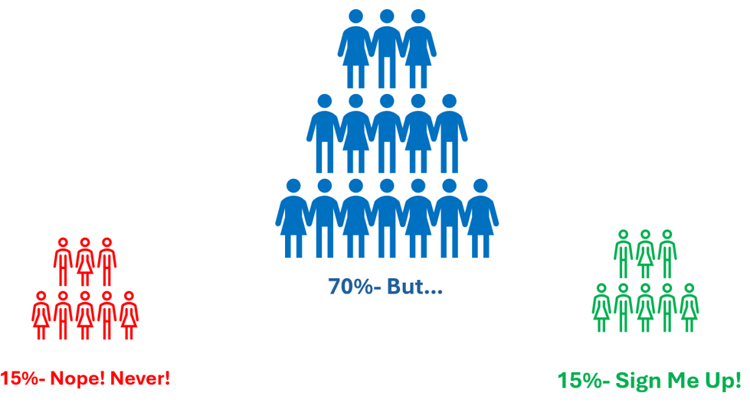
- You have 15% of eager dog-fooders, i.e., the ‘Sign Me Up!’ users.
- These are the folks who want to use the latest and greatest even if it’s still buggy. These are the users who are members of programs at Microsoft like Insiders, Frontier, or First Ring deployment.
- You will not get much incremental value from spending much time with these folks, as there is no gain in making happy users happier.
- You will always have 15% of users who will always resist even the simplest change, i.e., the ‘Nope! Never!’ users.
- They are often longtime employees who have been working the same way since the day they were hired. When you ask them why they do something, you get the most hated of all hated responses, “that’s the way it’s always been and how I was taught to do it.”
- Like the ‘Sign Me Up!’ users, spending time here is unlikely to move the needle much.
- The remaining 70% in the middle are open to change, but need support, i.e., ‘I like this…but’ users.
- These users are intrigued and interested in learning more, but there is something causing hesitation - some sort of qualifier.
- This is your target group for meaningful change and adoption, and where most of your time and energy should be spent. Focus your efforts on whatever that ‘but’ issue is and work to enable or address blockers to remove that hesitation from the discussion.
If done right, here’s what will happen over the next 90 days.
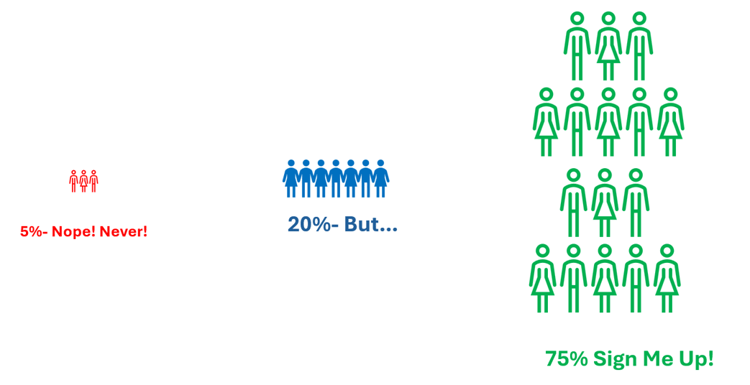
Many of your ‘I like this…but’ users will have now moved over to the green, ‘Sign Me Up!’ Users. Yes, you still have 20% in the middle. You will continue to focus on these folks, but you can see your efforts are working.
You will also now see the 15% of ‘Nope! Never!’ users are now down to just 5%.
Over time, with continued pressure from the green group, that number will drop to 2 or 3%.
At this point, you will work with Leadership to inform them of their holdovers. Leadership can use measures to make it clear that inaction is not an option (if that's their position). When you get down to 1-2% who are unwilling to change, Leadership needs to consider whether these holdovers are still helping or hurting your business’s overall efforts to be agile and continue to adopt new ways of working.
Want to see your actual 15/70/15 split? ENow True Adoption Center scores adoption by role and workload so you know exactly who to focus on.
What Is a Change Champion (and How Do You Choose One)?
Change Champions drive engagement and business transformation. They combine their own technical knowledge with peer relationships and trust to drive change. They will do this by evangelizing and helping their peers to learn about this new technology or process because they've experienced first-hand how it's benefitted themselves. These will be the advocates who help support and drive the adoption of a change initiative among peers and teams.
Now, I know what you're thinking: "those are my original 15%, my ‘Sign Me Up!’ Users. In the past, I've found that choosing 2-3 people from each job role (a mix of ‘Sign Me Up!’ users and ‘I like this…but.’ folks) is the best approach. That way, when someone says, "this won't work for my role," a peer in that same role can show them how it actually does.
When choosing your Change Champions, use the following criteria to decide who the best candidates might be:
- Are they influential and trusted: Are they respected by colleagues, and can they help positively influence attitudes toward change?
- Are they good communicators: Can they help explain the purpose, benefits, and impact of the change in relatable terms?
- Are they connectors: Do they often act as a bridge between leadership and employees, sharing feedback and addressing concerns?
- Are they role models: Do they demonstrate commitment by adopting new behaviors and tools early?
- Are they problem solvers: Do they help identify resistance and work to overcome barriers?
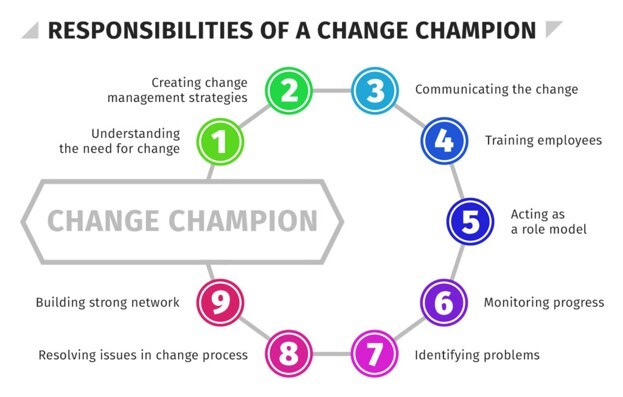
These will be your users who will help support:
- Advocacy: They will help promote the change and its benefits to others.
- Engagement: They will help encourage participation and involvement in change-related activities.
- Feedback Loop: They will help collect input from employees and communicate to the change management team.
- Support: They will be the ones who will provide guidance and reassurance during the transition.
How to Build a Change Champion Program (Step by Step)
We have now identified who the key stakeholders are and used their feedback to pin down the business scenarios that will change. It’s time to build your plan.
Rather than go through every single step here, I will point you to Champion – Microsoft Adoption. While at Microsoft, I worked closely with Karuana Gatimu and her team, who built this content. It even includes a series of videos I made while at Microsoft that show customers how they can successfully enable remote work.
Start with Build Your Program.
This has step-by-step guides on how to build a sustainable change management program, including:
- Key Steps in the Adoption Process
- Resources Provided
- Role and Importance of Champions
- Motivating Champions
- Building a Sustainable Community
- Five Steps to Develop a Champions Community
- Launch Planning and Execution
- Champion Involvement and Recognition
- Checklist for Champions Program
Next, Manage Your Program gives you tools for:
- Program management.
- Steps to create a leaderboard to track your campaigns across the Champions Group.
- Digital badging tools help your users see and identify their champions easily.
- Adoption-themed tournaments to gamify learning and create an environment for users to share their success across the team or company.
Streamline End User Training brings you ways to:
- Learn about best practices for end user training.
- Enable champions with resources including the Productivity Library and Productivity Training content that you can use within your own LMS (Learning Management System) like Viva Learn.
To hear lessons learned from other companies like Lego, Polaris, Kent State University, and the Special Olympics, check out my series of videos in the hub on Enabling Remote Work.
Finally, see how storytelling can increase impact by sharing use cases, successes, and overcome hurdles, in Storytelling for Champions, and Tracy Van der Schyff's great post on Storytelling That Sticks: Driving Copilot Adoption Through Communication.
In our final blog of this series, we will cover the importance, as well as tips and tricks, on how to get your Leadership team to use these new tools or ways of working.
Until then-
Stephen
Frequently Asked Questions About Change Management and Adoption
Why do employees resist change?
Most resistance comes down to fear, not defiance. Employees worry about job security, doubt leadership’s intentions, feel left out of decisions, or fear they won’t master the new tools. Poor communication and past failed rollouts make it worse. Address the fear first and the resistance usually drops.
What is the 15/70/15 rule in change management?
It is a way to focus your adoption effort. In any group, roughly 15% of users adopt eagerly, 15% resist no matter what, and 70% sit in the middle: open to change but held back by a specific concern. Spend your time on that 70%, because that is where adoption is actually won.
What is a change champion?
A change champion is a trusted peer who advocates for a new tool or process inside their own team. They pair hands-on knowledge with peer relationships to help colleagues learn, answer role-specific objections, and feed concerns back to the project team. Champions move adoption faster than a top-down mandate ever will.
How many change champions do you need?
Pick 2 to 3 champions per job role, mixing eager adopters with people who were hesitant at first and came around. Role coverage matters more than headcount: when someone says, “this won’t work for my job,” a peer in that same role can show them it does.
How do you measure change management success?
Track adoption and sentiment together. Use governance and adoption analytics for usage data, and surveys or feedback sessions for how people feel. Set reasonable adoption KPIs up front, watch the resistant group shrink over time, and adjust based on what the data and feedback tell you.
What is the most common change management mistake?
Treating it as a technical project instead of a people project. Rollouts stall when leaders focus on deploying the tool and skip the communication and hands-on support that get people to actually use it.
Stop guessing where your users are in the 15/70/15 split.
A major challenge of implementing a change management program is knowing who has adopted and who is stuck. ENow True Adoption Center shows you exactly that: role-based adoption scores, a Copilot Readiness Score, and live usage across Teams, Copilot, SharePoint, and OneDrive. It turns your 15/70/15 split from a hunch into a dashboard, so you can put your effort on the 70% who need support and prove ROI to leadership with real numbers.
See your adoption data →