Office 365 Monitoring: Microsoft Forms Service Incident (Feb. 24, 22)

On February 24, 2022, at ~01:31 am UTC, Microsoft communicated via tweet (@MSFT365status) that they...


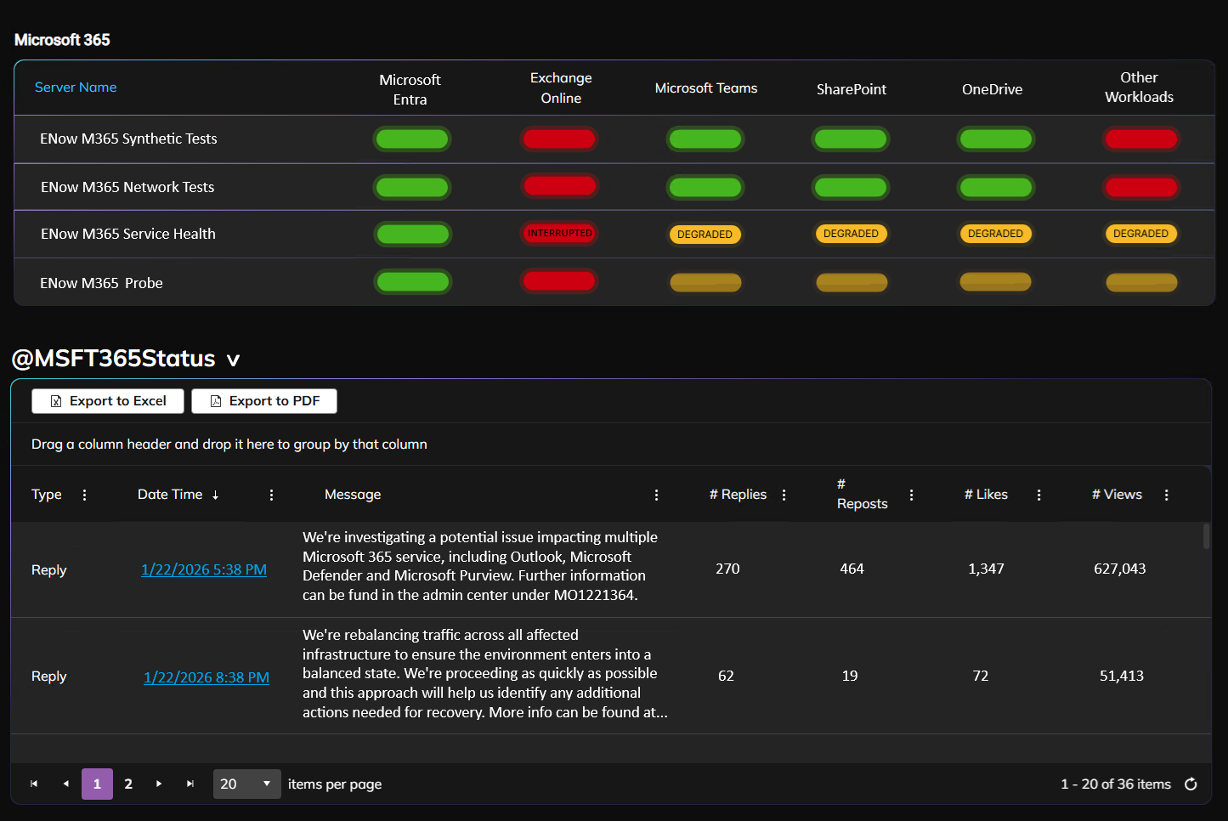
On January 22, 2026, a significant service incident began affecting Microsoft 365 users throughout North America, causing widespread accessibility issues and feature failures. The disruption originated from a malfunctioning infrastructure segment that failed to process data traffic correctly, leading to Outlook error messages and malfunctions within Microsoft Teams, SharePoint, and administrative portals. Technical teams initially addressed the root cause by repairing the faulty hardware but encountered further delays when a targeted configuration change inadvertently created new traffic imbalances. Throughout the afternoon, engineers worked to incrementally rebalance server loads and restore full functionality to impacted applications like Exchange Online and Microsoft Fabric.
Based on the service degradation logs for incident MO1221364, the following Microsoft 365 services and specific functionalities were impacted:
When the outage occurred, ENow customers didn’t have to guess whether the issue was local, user-specific, or systemic.
Immediately, our clients received a text notifying them of an outage. Opening the ENow Microsoft 365 Monitoring dashboard immediately surfaced clear signals. Microsoft 365 Configuration was flagged as Degraded, while both Outlook functionality and Exchange Online services were marked in Critical states. This gave administrators instant confirmation that the issue extended beyond isolated reports or individual mailboxes and was impacting the service itself.
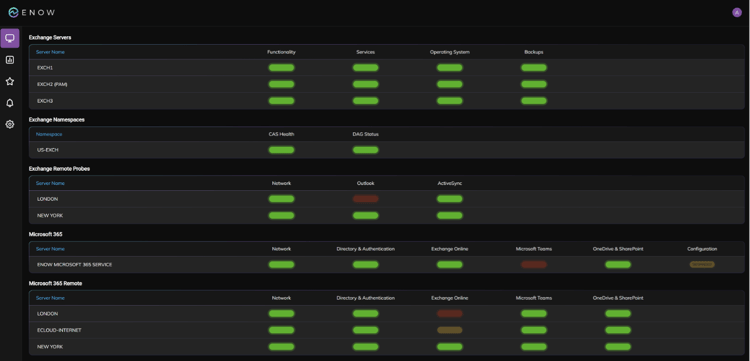
ENow’s EMS Alert Intelligence was able to determine from the results captured for Exchange Online and send a single critical alert indicating to the Exchange Online administrators that Exchange Online was down and impacting their licensed users.
This alert intelligence is especially valuable during outages, when admins are already under pressure and time is the most constrained resource. ENow removes the noise so teams can focus on response, communication, and impact mitigation instead of alert triage.
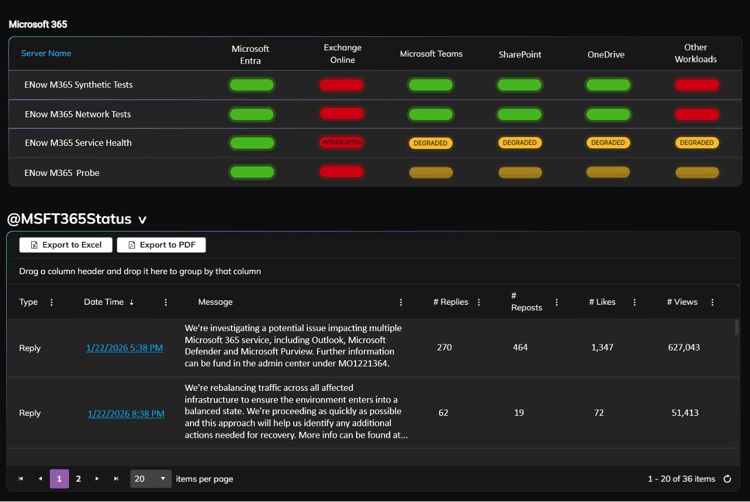
Admins could then quickly validate what they were seeing by cross-referencing ENow’s integrated Microsoft Service Status Dashboard alongside the live X feed for @MSFT365Status. Having all of this context in one place reduced the need to jump between portals, browser tabs, and third-party sites while troubleshooting.
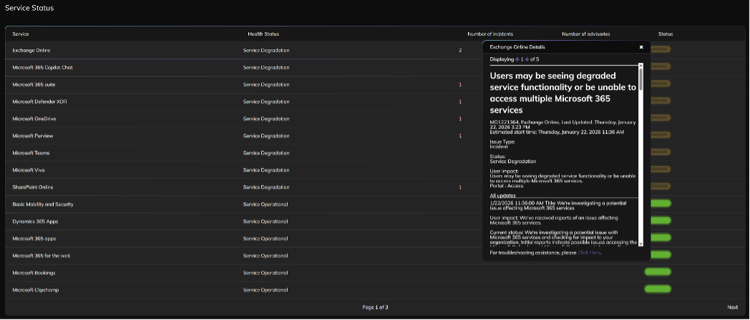
At the same time, ENow’s Mail Flow Status tests began showing failures across the board, reinforcing that this was not a configuration issue or tenant-specific misstep. This confirmation is critical during outages because it allows admins to confidently shift from troubleshooting mode to incident management mode.
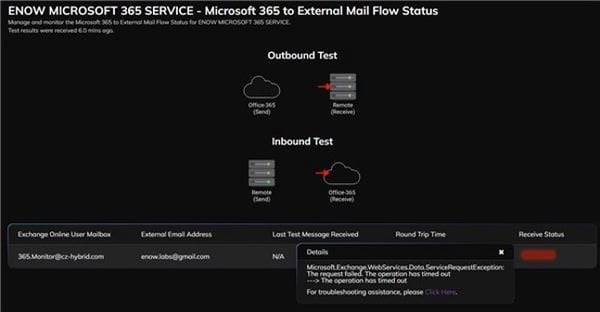
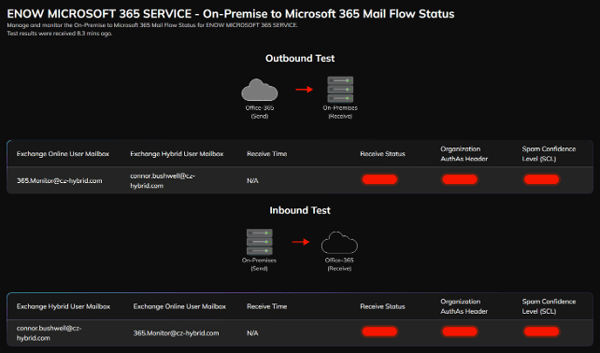
Outages are not just technical events, they are trust events. When email stops flowing or Outlook becomes unusable, admins are immediately pulled into a high-stakes situation involving leadership, help desks, and end users.
Admins get immediate, defensible insight into what is actually broken, how widespread the issue is, and which workloads are affected, without relying on guesswork or user speculation.
By correlating service health, configuration state, and real transaction testing, ENow helps admins quickly confirm, this is a Microsoft outage, not something we caused. That confidence is essential when communicating with executives and stakeholders.
With intelligent alerting, integrated service status visibility, and real-time testing, admins can respond faster, communicate more accurately, and avoid wasting time chasing false positives or local misconfigurations.
Instead of reacting blindly and waiting for answers, ENow enables Microsoft 365 admins to stay informed, reduce noise, and lead with facts when it matters most. During an outage, that difference is everything.
The incident on January 22 (MO1221364) and the outage on January 21 appear to be separate events with different causes and scopes of impact, despite occurring on consecutive days.
Different Causes: The January 21 outage was attributed to a third-party issue, specifically believed to be an unnamed Internet Service Provider (ISP) affecting connections between users and Microsoft services. In contrast, the January 22 incident was caused by an internal failure within Microsoft’s own dependent service infrastructure in North America, which impacted load balancing.
Different Services Impacted: While the January 21 event caused issues logging into Microsoft 365 and Teams, it notably did not affect Outlook. The January 22 incident, however, heavily impacted Outlook (preventing email transmission) and also took down the Microsoft 365 admin center.
Duration: The January 21 outage was described as "brief" and "resolved fairly quickly," whereas the January 22 incident was more severe and prolonged, with recovery efforts complicated by attempts to fix the load balancing.
IT administrators need robust Microsoft service monitoring for several critical reasons. The incident on January 22, 2026, highlights scenarios where standard administrative capabilities were compromised, leaving IT teams blind without external status updates.
Perhaps the most critical reason for independent or external monitoring is that the native Microsoft tools IT administrators use to check service health can themselves become victims of the outage. During this incident, the specific infrastructure failure prevented access to the Microsoft 365 admin center, Microsoft Purview, and Microsoft Defender XDR. Without access to these portals, administrators relying solely on the internal dashboard would have no way to verify if the issue was a general outage or a local network failure.
When users report issues, administrators typically rely on diagnostic tools to investigate. However, service monitoring informs admins when these troubleshooting tools are also broken, preventing wasted effort.
As mentioned, the outage on January 21 was caused by an ISP/third-party issue, whereas the January 22 event was a Microsoft infrastructure failure. Service monitoring allows administrators to quickly differentiate between:
Modern cloud services are deeply interconnected. Monitoring helps admins understand how a core infrastructure failure spreads to seemingly unrelated tools. In this case, a load balancing issue initially impacting Outlook eventually degraded:
Without detailed service logs, an admin might not intuitively link a "printer failure" to an "Outlook outage."
Recovery is not always linear. Service monitoring provides real-time updates on repair attempts that may accidentally worsen the situation.
Learn about ENow's Microsoft 365 Monitoring and Reporting Platform, or contact us for a Microsoft 365 Monitoring Demo.

On February 24, 2022, at ~01:31 am UTC, Microsoft communicated via tweet (@MSFT365status) that they...
On February 21, 2022, at ~03:58 am UTC, Microsoft communicated via tweet (@MSFT365status) that they...