Cut Costs on Microsoft EA Renewals: IT and Procurement Collaboration Guide

Renewing a Microsoft Enterprise Agreement (EA) is one of the most significant technology purchasing...


A strategic guide to aligning Microsoft 365 licenses with real user needs while reducing waste and avoiding compliance drift.
Most organizations overspend on Microsoft 365 licensing not because they buy the wrong products, but because they assign the right products to the wrong people. At the same time, many teams drift into unintentional non-compliance because tenant-wide features are enabled without understanding which users are entitled to benefit from those features under Microsoft’s licensing terms.
Both problems have the same root cause: no clear map of who your users are, what they need and which features their licenses unlock.
In practice, this shows up as unexpected true-up costs, last-minute license purchases during audits, and security features that quietly expand beyond the users they were intended for. By the time teams notice, the damage is already done.
User profiling and feature mapping are the foundation of every successful Microsoft 365 licensing strategy. Without them, cost optimization becomes guesswork, and compliance management becomes reactive. With them, organizations gain clarity, predictability, and the ability to make licensing decisions that are defensible and cost aware.
This blog explains how profiling and feature mapping work, why they matter so much and how to use them to stabilize both cost and compliance across your M365 environment.
Microsoft’s licensing ecosystem has become more layered. Project has multiple tiers. Visio has multiple tiers. Viva includes limited capabilities bundled with certain Microsoft 365 SKUs, with advanced analytics and insights requiring additional paid licenses. Security capabilities like DLP apply across entire tenants, even when only a subset of users is licensed.
As these product families expand, so does the risk of mismatched assignments.
User profiling prevents that by defining who needs what before licenses are ever assigned. Importantly, User profiling is not a documentation exercise — it is a decision framework that determines which licenses are assigned by default and which require justification.
Without profiling, organizations fall into common traps:
Profiling creates structure. Instead of guessing, IT teams rely on defined groups that match roles, usage behavior, and business functions. Profiles establish default licensing behavior. Exceptions still exist, but they become visible, intentional, and reviewable instead of accidental.
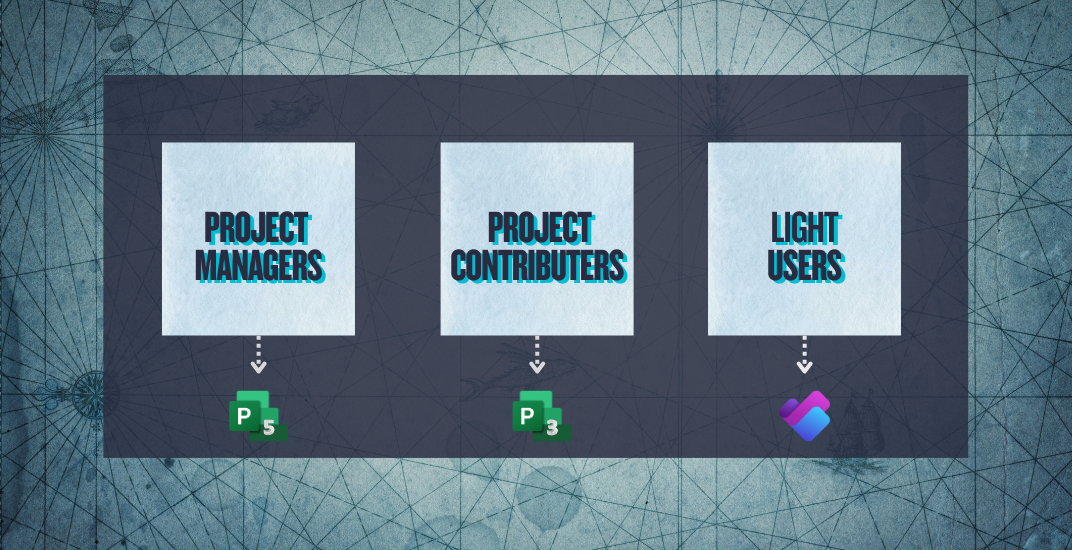
Profiling is not complicated, but it must be intentional. The strongest governance programs define license profiles that reflect actual job responsibilities and usage patterns.
Project Managers: Project Plan 5 for portfolio management, enterprise scheduling, and advanced analytics.
Daily project contributors: Project Plan 3 for desktop client and resource management.
Light users: Microsoft Planner (basic task management capabilities) for task views and collaboration.
Power users: Visio Plan 2 for advanced engineering diagrams, network models, and desktop client.
Light users: Visio Plan 1 for web-based diagramming and simple workflows.
Leaders and analysts: Viva Insights premium capabilities, where advanced analytics and insights are required.
General employees: Viva Connections and Viva Learning basic capabilities, where included with their Microsoft 365 license.
Specific departments: Viva Engage, Goals, or Learning based on business needs.
The goal is to align capability with need so that users get the right tier without overspending.
User profiling prevents over-licensing.
Feature mapping reduces the risk of non-compliance by identifying entitlement gaps before they become audit issues.
Feature mapping identifies which users are accessing which capabilities and compares this activity to the licenses they hold. This matters because some high value features operate at the tenant level, where they may apply to all users even if not all users are entitles.
For example:
Data Loss Prevention (DLP) can apply across workloads at the tenant level once enabled, but licensing requirements depend on which DLP policies, workloads, and enforcement actions are in use.
Legal hold and similar e-discovery functions can become active for everyone regardless of license tier.
Defender and certain Entra ID capabilities may impact users who are not licensed for them.
When a user on an F1 license benefits from or actively uses a feature that requires E3 or E5 entitlements, the organization may be non-compliant, even if the exposure was unintentional.
Mapping feature access to actual licensing is the only way to catch this early.
Profiling answers:
Who should have access?
Feature mapping answers:
Who actually has access?
When combined, they create a complete picture:
This approach is both preventative and corrective, which is why it forms the foundation for stronger licensing governance and audit readiness.
Organizations typically overspend because they lack visibility into which users actually use the licenses they hold. Profiling solves the assignment problem. Feature mapping solves the validation problem.
Together, they help IT teams:
Move light users to lower tiers.
Reclaim unused licenses to a license pool
Avoid buying new licenses when reclaimed licenses can be reassigned.
This structure also supports proactive lifecycle management for high-cost tools like Project and Visio, where temporary assignments often become permanent through oversight.
Many teams assume that subscription licensing protects them from compliance issues. Unfortunately, this is not true when tenant-wide features come into play.
Feature mapping reveals critical questions:
Are F1 or F3 users benefiting from DLP even though they are not licensed for it?
Has Viva analytics been inadvertently enabled for users without proper entitlements?
Are Defender or Entra ID features being consumed by departments with lower tier licenses?
Profiling ensures the right users receive the right level of access.
Mapping ensures no one receives features outside their entitlements.
Compliance becomes more manageable and less reactive..
Manual profiling and mapping are possible, but not scalable. This is where visibility tools, such as ENow’s licensing and usage intelligence, create significant efficiency.
Visibility tools help organizations:
See who is logging into Project, Visio, and Viva.
Understand which features are being used and at what frequency.
Identify idle or lightly used licenses.
Detect mismatches between assigned licenses and accessed capabilities.
Highlight users potentially benefiting from tenant-wide security features where licensing entitlement should be reviewed.
With accurate data, profiling becomes easier, and feature mapping becomes precise and actionable.
Here is a lightweight way to begin profiling and mapping without overwhelming your team.
Profiles shift over time. Quarterly reviews keep licensing aligned with actual needs.
As Microsoft continues to expand its catalog of add-on tools, analytics modules and advanced security capabilities, the risk of misalignment grows. Costs rise when roles are unclear. Compliance risk increases when infrastructure features activate across the tenant.
Profiling and feature mapping give organizations control.
They create a licensing environment that is more predictable, audit-defensible, and aligned with real business needs.
They also serve as the gateway to more advanced optimization programs including lifecycle management, reclamation of workflows, and renewal preparation.
The strongest M365 licensing programs have one thing in common.
They start with user profiling and feature mapping.
The next article explains why subscription licensing alone does not guarantee compliance, particularly when tenant-wide features are enabled.
If you want immediate insight into your own profile groups, feature access patterns, and unused licenses, explore ENow’s License Management and Optimization tools.
Most organizations overspend because they cannot see which users actually need advanced licenses, or which features are being accessed across the tenant. ENow’s License Management and Optimization tools give you clear visibility into usage patterns, feature access and reclaimable licenses so you can make confident, data-driven decisions.

Nikki Vijeh has spent the past 15 years helping organizations navigate the complexities of licensing, cloud strategy, and FinOps. She has built and led Microsoft and Cloud Optimization practices, delivering innovative solutions that simplify operations and maximize business value. A proven IT services leader, Nikki has played a pivotal role in forming high-impact technology partnerships and driving sustainable growth. She works closely with partners and enterprise customers to optimize IT investments, negotiate favorable contracts, and align cloud adoption with financial accountability. Her strategic insight, hands-on expertise, and customer-first approach have helped organizations save millions in IT spend while building more efficient and scalable technology.
.png?height=175&name=Microsoft%20EA%20Renewals%20How%20IT%20and%20Procurement%20Can%20Collaborate%20to%20Cut%20Costs%20and%20Avoid%20Over-Licensing%20(1).png)
Renewing a Microsoft Enterprise Agreement (EA) is one of the most significant technology purchasing...

For many small and mid-sized organizations,...