Renewing your Microsoft Enterprise Agreement (EA) used to be a fairly predictable process. However, As of Jan 2025, Microsoft is actively forcing an EA transition to MCA. With the introduction of the Microsoft Customer Agreement (MCA) and ongoing changes to how licenses, Azure spend, and reporting are handled, the stakes are much higher. A rushed or incomplete review can lock your organization into unnecessary costs, eliminate true-down flexibility, and make future budgeting a nightmare.
Too often, EA renewals are treated as a “check-the-box” IT exercise, yet they impact far more than technology. Procurement, Finance, Security, and Legal all have critical stakes in the outcome. If these teams don’t collaborate and challenge assumptions, it’s easy to end up over-licensed, paying for duplicate tools, or missing opportunities for funding and discounts.
This blog walks you through the ultimate EA contract review checklist, designed to help every stakeholder including IT, Procurement, Security, and Legal, avoid common pitfalls and negotiate from a position of knowledge not urgency. Whether you’re six months or a full year away from renewal, following this checklist can mean millions saved and far fewer post-renewal surprises.
Why Microsoft EA Reviews Are More Critical Post-MCA
Microsoft’s transition from EA to MCA has introduced several major challenges for enterprises:
- Loss of reporting continuity: MCA use different billing structures, categories, and naming conventions, making historic Azure spend reports hard to access or unusable.
- Multiple, fragmented invoices: MCA billing supports multiple billing profiles/invoice sections. Costs no longer align cleanly to departments, complicating chargebacks.
- Forced subscription model: MCA does not include perpetual license + Software Assurance (SA). Software Assurance (SA) doesn’t exist under MCA, reducing flexibility.
- True-down limitations: EA provided structured annual true‑up and true‑down only at renewal. MCA lacks that formal reconciliation, once you commit to a certain license count or Azure spend, it’s difficult to reduce mid-term.
Given these challenges, a structured EA review is no longer optional, it's your only safeguard against overspending and operational disruption.
Who Needs to Be Involved in the EA Review Process?
EA renewals aren’t just IT’s responsibility. A successful contract review involves a cross-functional team:
- IT: Understands technical needs, future projects, and validates server/application requirements.
- Procurement & Finance: Focuses on cost optimization, budgeting accuracy, and discount negotiations.
- Security/Compliance: Ensures risk management, governance, are justified and not duplicated.
- Legal: Protects the organization with proper contract language, SLAs, and audit protections.
By pulling these stakeholders together early, you can challenge assumptions, avoid unnecessary commitments, and build a renewal strategy that balances functionality, cost, and risk.
Microsoft EA Renewal Checklist: Key Considerations for Each Stakeholder
This checklist helps each stakeholder focus on their priorities while collaborating on shared goals.
A. IT Team Considerations
Primary Focus: Technology functionality, system performance, future readiness.
What Matters Most:
- Ensuring the right license SKUs (e.g., M365 E3 vs E5, etc.) are in place to support current and future technical needs (and ensuring these align with the user profile)
- Planning seamless upgrade paths (via Software Assurance for on-prem workloads)
- Server/application compatibility, lifecycle planning, and support end-of-life transitions
- Minimal disruption to infrastructure or roadmap during renewal
- Leveraging technical flexibility options (e.g., Hybrid Use Benefit, true-up capabilities)
- Ease of auto-provisioning, administration, and deployment
Key Blind Spot: Cost optimization, IT often favors feature-rich SKUs (e.g., E5) regardless of actual user need
B. Procurement & Finance Considerations
Primary Focus: Cost control, licensing model comparison, financial forecasting, and ROI.
What Matters Most:
- Ensuring cost increases by headcount and new workloads are justified with a business case
- Avoiding over-licensing and duplicate tool spend
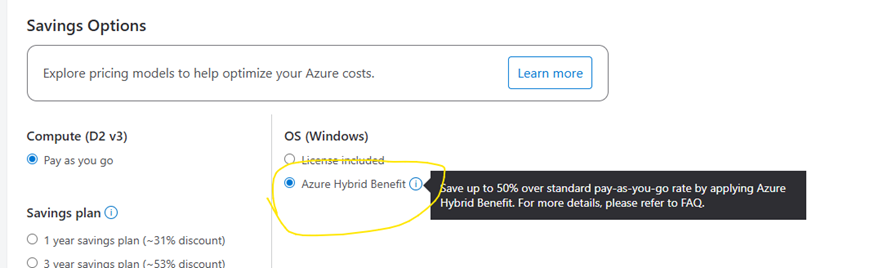
- Leveraging Azure Hybrid Benefit and true-down rights
- Tip: When moving servers to Azure, check the Azure Hybrid Benefit box in the portal to use existing server licenses and cut costs.
- Accurate forecasting for server growth/shrinkage and cloud service spend accurately
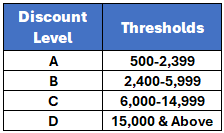
- Achieving the best possible pricing tiers and discounts- verifying your correct Microsoft discount tier to ensure the correct tier is applied
- Comparing EA vs CSP vs MCA to determine the most cost-effective licensing model
- Tip: We typically recommend avoiding MCA currently due to the current issues. Unless you've taken the time to review and understand the impact in full, you'll likely be hit with surprises.
- Securing price protection and long-term budget predictability by negotiating multi-year locks or rate caps
- Negotiate beyond discounts, gaining funding for POCs, migrations, training, or Teams/Copilot rollouts
Key Blind Spot: Underestimating technical nuance. Needs IT’s help to validate license appropriateness and deployment impact
C. Security & Compliance Considerations
Primary Focus: Ensuring secure, compliant environments without technology redundancy.
What Matters Most:
- Confirming security features in Microsoft SKUs are fully utilized before investing in third-party tools (e.g., CrowdStrike, Okta)
- Avoiding “triple-pay” scenarios for endpoint protection, MFA, conditional access, etc.
- Collaborating with IT to align security roadmaps with licensing decisions
- Ensuring appropriate data privacy controls are in place, and configured appropriately (e.g., DLP, Microsoft Purview)
- Selecting the right licensing tier (E3 vs E5) based on actual security needs
- Monitoring compliance with audit clauses and industry standards (e.g., GDPR, HIPAA)
Key Blind Spot: Siloed decision-making. Security may pilot tools without informing IT or procurement
D. Legal & Contractual Considerations
Primary Focus: Risk mitigation, contract flexibility, and regulatory protection.
What Matters Most:
- True-down rights and contract language that allows flexibility for reorgs or divestitures
- Multi-layered SLA commitments with remedies for downtime or poor service
- Price protection and transparency (via Customer Price Sheet)
- Early termination rights and post-term extension options
- Inclusion of data privacy clauses (e.g., GDPR, HIPAA), and location-based storage or data handling controls
- Understanding licensing audit terms and limiting liability from unintentional misuse
- Negotiating favorable terms on renewals, extensions, and support
Key Blind Spot: May lack visibility into the technical or financial implications of licensing choices.
When to Renew Your EA Renewal for Better Discounts
Microsoft’s fiscal year ends on June 30, with mid-year incentives in December. In our experience, the best deals typically happen in:
- May–June: Largest discounts as Microsoft pushes to close the fiscal year strong.
- December: Mid-year promotions are often available.
If your EA expiration doesn’t align, consider requesting for an extension or a short-term agreement, even at a slightly higher rate, to move your renewal to a more discount-friendly period. Always escalate to Microsoft’s Business Desk if your account manager won’t budge on pricing.
Common Microsoft EA Mistakes to Avoid
- Treating the renewal as an IT-only decision.
- Accepting the MCA agreement terms without understanding the reporting and budget implications.
- Over-committing on Azure spend without optimizing first.
- Ignoring duplicate tools that inflate costs.
- Waiting until the last 30–60 days to start discussions with Microsoft.
Not seeking out help from experts when needed. Most organizations only handle a licensing event every few years. It can be easy to miss what has changed since the last time.
How ENow Helps Organizations Optimize Their EA ROI
An EA renewal is too important to leave to assumptions or last-minute negotiations. ENow License Optimization & Negotiation Services provide:
- Visibility: Tools that map actual license usage across your enterprise to identify waste.
- Optimization: Recommendations to right-size SKUs and eliminate duplicate spend.
- Negotiation support: Guidance on terms, incentives, and escalation strategies to secure the best deal.
Don’t wait until it’s too late to influence your EA renewal. Book a Microsoft EA Optimization Review with ENow and walk into negotiations armed with data, leverage, and a proven cost-saving strategy.


.png)


.png?height=175&name=Microsoft%20EA%20Renewals%20How%20IT%20and%20Procurement%20Can%20Collaborate%20to%20Cut%20Costs%20and%20Avoid%20Over-Licensing%20(1).png)