ENow 8.3 Release Summary

Enhancements for Managing Microsoft 365 Licensing & Storage Costs, Operational Efficiencies, and...


Modern Microsoft environments are growing more complex, not simpler. As organizations expand across Microsoft 365, Exchange, Active Directory, and hybrid infrastructure, administrators are expected to maintain uptime, security, and performance with little margin for error.
Monitoring systems generate large volumes of alerts, yet identifying the signals that actually require investigation can still take time. At the same time, diagnosing collaboration issues, mail delivery delays, or directory infrastructure problems often requires switching between multiple Microsoft portals.
As Microsoft 365 environments grow more complex, administrators need clearer monitoring signals, better visibility into collaboration services, and earlier detection of infrastructure issues.
ENow Management System 8.6 focuses on improving those operational realities.
This release introduces enhancements designed to reduce alert noise, expand Microsoft 365 monitoring visibility, improve detection of messaging and infrastructure issues, and simplify platform administration.
Below are several key areas where EMS 8.6 improves day-to-day operations for Microsoft administrators.
Monitoring environments evolve over time. Alert thresholds originally tuned for one workload pattern can begin generating frequent transient alerts as usage patterns shift.
Over time, this can make it harder for administrators to quickly identify alerts that require investigation.
EMS 8.6 introduces Observation Mode, which analyzes alert activity across the environment and identifies patterns that commonly generate unnecessary noise. Observation Mode is enabled by default after upgrading and analyzes alert behavior without making configuration changes. Administrators can review these patterns before adjusting thresholds.
Building on this analysis, Automatic Tuning can apply recommended threshold adjustments that reduce transient alerts while preserving meaningful monitoring signals.
The release also introduces alert settings backup and restore. Alert configurations are automatically backed up during upgrades, allowing administrators to revert to previous configurations if needed.
EMS 8.6 also adds Event ID monitoring, enabling administrators to track specific Windows Event Log entries across servers running the ENow Client, including:
Domain Controllers
Exchange Servers
Federation Servers
Microsoft Entra Connect servers
SQL Servers
Together, these capabilities help teams focus on alerts that require investigation rather than managing unnecessary monitoring noise. The goal is simple: restore confidence that when an alert fires, it is worth responding to.
As organizations rely more heavily on Microsoft Teams, SharePoint, and OneDrive, administrators often need deeper insight into the real user experience across these services.
EMS 8.6 expands Microsoft 365 monitoring capabilities to better align with modern security practices and evolving Microsoft APIs.
Synthetic monitoring tests for Teams, SharePoint, and OneDrive now support MFA-enabled monitoring accounts, allowing organizations to maintain multifactor authentication requirements while continuing to validate service availability and functionality.
The release also expands Microsoft Teams call quality diagnostics. Updates aligned with the Microsoft Teams Admin API bring additional diagnostic data directly into EMS dashboards.
Updated dashboards include:
Microsoft Teams CQD Support Portal
Microsoft Teams Poor Call Snapshot
Large Meeting Performance Dashboard
EMS 8.6 also introduces monitoring telemetry for video performance and VBSS (Video Based Screen Sharing). These metrics help identify issues such as frame loss, video freezes, codec adaptation, and screen sharing reliability.
These improvements provide administrators with clearer insight into collaboration performance issues that affect users.
Operational issues in Microsoft environments often surface first as user complaints, before administrators have clear indicators of where the problem originates.
EMS 8.6 introduces several enhancements designed to help administrators detect these issues earlier.
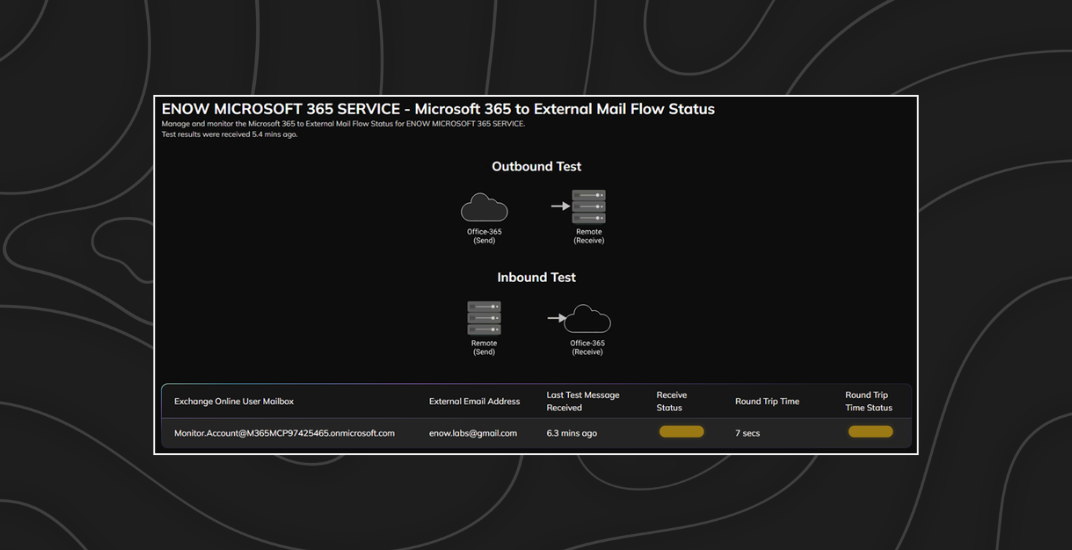
Following the recent Exchange Online outage on January 22nd, 2026, we noted an opportunity to further enhance the Cloud Mail Flow test. While working with our customers who were able to detect with the Cloud Mail Flow test that Exchange Online was encountering an issue, we discovered another metric that would have provided additional insights. For Exchange environments, the release adds round-trip alerting for mail flow monitoring tests in both Exchange Online and on-premises Exchange deployments. Round-trip time measures how long a monitoring message takes to return to the system.
Administrators can configure alert thresholds to detect mail delivery delays that may indicate problems affecting:
cloud mail flow in Exchange Online
external message delivery
transport infrastructure performance
For organizations running Exchange Server Subscription Edition, EMS 8.6 also adds back-pressure monitoring, which alerts administrators when resource constraints begin affecting Exchange transport services.
The release also expands monitoring within Active Directory infrastructure.
EMS 8.6 introduces DNS monitoring capabilities for Domain Controllers, validating both configuration and functionality through checks including:
DNS server functionality testing (IPv4 and IPv6)
domain and forest record validation
forwarder functionality testing
hostname record validation
root hints functionality testing
DNS name resolution monitoring can also run tests from the EMS web server or any monitored server to validate DNS records including:
A
AAAA
CNAME
MX
NS
SOA
SRV
TXT
These tests help administrators confirm that core infrastructure supporting authentication and service discovery is functioning correctly.
As collaboration environments expand, administrators often need better visibility into how access is granted across Microsoft 365 workloads.
EMS 8.6 introduces SharePoint Broad Access Group Detection, providing visibility into sites shared using groups such as:
All Users
Everyone
Everyone except external users
These groups can unintentionally expose content to broader audiences than intended. This capability helps administrators identify where these permissions exist and determine whether access aligns with governance policies.
The release also enhances Exchange mailbox reporting, allowing administrators to include additional user attribute data when exporting mailbox reports in PDF or CSV format.
These improvements support stronger governance visibility across collaboration and messaging environments.
EMS continues its transition toward centralized administration through the web console.
EMS 8.6 relocates several configuration options to the web interface to streamline administrative workflows. Settings that have been migrated include:
Alert Exclusions (now under Alert Settings)
HTTP Proxy configuration
Auto Refresh Interval
Agent Authorization
Log Level settings
SQL Options
Subscription Status
Moving these capabilities into the web console simplifies configuration and reduces reliance on legacy interfaces.
For teams responsible for Microsoft 365, Exchange, and Active Directory operations, the EMS 8.6 release focuses on practical operational improvements:
Less alert noise through Observation Mode and automatic threshold tuning
Better collaboration diagnostics across Microsoft Teams, SharePoint, and OneDrive
Earlier detection of mail flow and infrastructure issues through round-trip alerting and expanded DNS monitoring
Improved visibility into governance risks such as broadly shared SharePoint sites
Simplified platform administration through expanded web console configuration
These updates help administrators spend less time managing monitoring configuration and more time identifying and resolving real operational issues.
To see the full list of enhancements and upgrade guidance, review the EMS 8.6 release documentation or explore how ENow helps organizations monitor and operate Microsoft 365, Exchange, and Active Directory environments.
View the full release notes
Request a Monitoring product demo

ENow protects and optimizes Microsoft 365, Copilot, and Entra ID, giving modern IT leaders clarity and simplicity to manage complex environments. From proactive monitoring to license optimization, adoption, and identity governance, ENow enables IT teams to manage, scale, and secure their Microsoft environment with confidence; all in one place, without the chaos.

Enhancements for Managing Microsoft 365 Licensing & Storage Costs, Operational Efficiencies, and...
