ENow M365 Governance Accelerator 1.0 General Availability

The Governance Gap That Copilot Revealed
Governance debt accumulates quickly. A site owner leaves,...


.png)
Microsoft 365 environments are getting larger, more complex, and more expensive to administer, manage, and govern.
Years of content growth have created storage that organizations may be paying for without understanding why. Collaboration improvements have created layers of external sharing and permissions that are difficult to evaluate at scale. Unused licenses continue to generate costs long after users have left the organization or changed roles or projects, while Identity controls determine who and what can access the environment.
At the same time, Microsoft 365 Copilot and AI make the exposure and quality of all this underlying data more relevant. Organizations need more than lists of users, files, permissions, and configurations. To manage a Microsoft 365 tenant and build the content, collaboration, and identity foundation that enables functional, safe, and successful AI use, organizations need to be able to answer key questions:
ENow created the free 365Gov Score alongside Microsoft MVPs so any team could answer that last question. It’s an independent, no-cost assessment that benchmarks and quantifies the current state of your Microsoft 365 governance, giving you objective evidence to inform what comes next - from shaping governance initiatives to making the case for additional time, resources, and investment with leadership.
Microsoft provides administrators with enormous amounts of information about their environment. The harder problem is turning it into decisions.
IT and Modern Workplace teams still need to answer questions such as:
That is the focus of ENow 365 Governance Accelerator v1.4.0: moving beyond reporting what exists, toward helping organizations understand what matters, why it matters, and what to do next when teams are also expected to keep dozens of other operational tasks and strategic transformation projects moving forward.
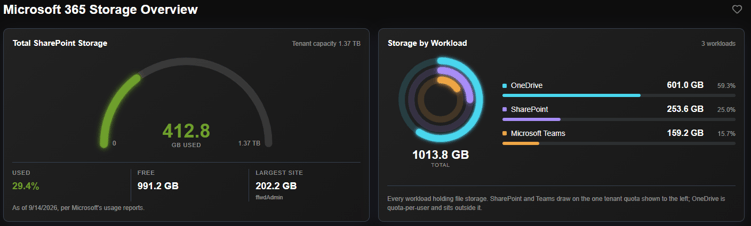 Figure 1. Microsoft 365 Storage Overview in ENow 365 Governance Accelerator
Version 1.4.0 of ENow's 365 Governance Accelerator expands governance across four major areas, including entirely new categories:
Version 1.4.0 also marks the official launch of Professional Edition, expanding the available report catalog with additional depth across Licensing, SharePoint, and OneDrive.
Behind the scenes, the processing engine has also been rebuilt to support the scale and analysis required for these capabilities.
Microsoft 365 storage volume increases due to version history, duplicate files, oversized content, and libraries sitting untouched for years. Companies end up bumping against their included capacity or writing a check for more. The result is bloated, growing storage costs, plus stale content and workspaces that muddy operational focus (and can negatively impact the quality of Copilot and AI results).
ENow’s new Microsoft 365 Storage category turns that inventory into a recovery plan by showing you how storage is distributed across your Microsoft 365 tenant. It encompasses which libraries and files drive consumption, where duplicates hide, which libraries have gone stale, and how much of your SharePoint footprint is nothing but old versions. The Storage Savings Calculator turns that picture into a decision, with a defensible answer to the questions leadership asks:
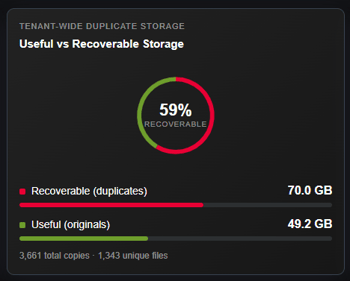
Figure 2. Useful vs Recoverable Storage in ENow 365 Governance Accelerator
With ENow 365 Governance Accelerator, teams can evaluate the impact of storage changes by modeling various remediation scenarios.
Move the slider to a version limit, and the calculator recalculates what you’d recover and what it’s worth, library by library. Three levers model the change before you act: version history, duplicate copies, and archiving, with no double-counting between them. It also separates the storage you get back outright from storage that simply moves to a cheaper rate, so the projection stays honest.
What comes back is a number you can take to leadership: if you’re inside your included Microsoft 365 capacity, a case for delaying your next purchase; if you’re already buying more, an annual cost you can stop paying, priced on your own agreement rather than an industry average.
Most SharePoint storage isn’t what you’d expect. Every save keeps the previous copy in full, not just the delta, up to 500 versions by default, and rarely is version control turned off or limited. Picture a file that starts at 100 MB and grows a little with every edit: 300 full-copy versions later, that one file’s history is consuming hundreds of GBs, almost all of it old copies no one will reopen.
ENow 365 Governance Accelerator v1.4.0 ranks libraries and individual files by how much of them is version history, finds the same file stored across several sites at once, breaks the estate down by file type, and flags content nobody has touched.
The ENow team believes that cost recovery shouldn’t be cost prohibitive. The entire Storage category (Savings Calculator included) ships in our entry-level Standard Edition. We’ve included these capabilities at an accessible price, so the teams under the most pressure to control cost can afford to.
Years of collaboration, external sharing, and one-off permission changes can leave organizations with more content exposure than teams realize. As AI becomes part of everyday work, understanding that exposure becomes even more important. Microsoft 365 Copilot respects existing permissions, meaning the content users can access can potentially become part of their AI experience.
But not all sharing represents the same level of risk. An anonymous link with edit permissions and no expiration date deserves different attention than a read-only link expiring next month. A dormant library that still exposes information externally is more than a storage-cleanup opportunity.
For IT teams managing thousands or millions of files, links, users, and permissions, simply identifying what is shared isn’t enough. They need to understand what is exposed, who can access it, and where risk warrants attention first.
ENow 365 Governance Accelerator v1.4.0 introduces new and enhanced Exposure dashboards designed to turn complex sharing and permission data into prioritized action:
This exposure information moves teams from inventory to impact and action with less time sorting through reports and admin centers, faster identification of material exposure, and a stronger governance foundation for Microsoft 365 and Copilot/AI initiatives.
Unused Microsoft 365 licenses are an obvious place to look for savings. Determining whether a license is actually safe to remove is harder.
The new License Optimization engine in ENow 365 Governance Accelerator combines multiple signals, including account status and last sign-in activity before making a recommendation.
The recommendation logic is deliberately conservative. If the necessary validation cannot be completed, the recommendation defaults to keeping the license.
New usage reporting also provides visibility into Microsoft 365 application usage across Windows, Mac, mobile, and web.
The objective is not simply to identify inactive users. It is to give administrators the evidence they need to find potential savings and confidently decide whether action is appropriate.
Microsoft 365 access and governance ultimately depend on the identity layer driven by Microsoft Entra ID (Microsoft’s identity system).
Version 1.4.0 adds five Entra ID governance tests covering foundational controls, including MFA coverage, Global Administrator limits, and risky sign-in policies driven by any Conditional Access policies in your tenant.
Each evaluation provides a clear pass/fail result for the tenant’s current configuration along with step-by-step remediation recommendations.
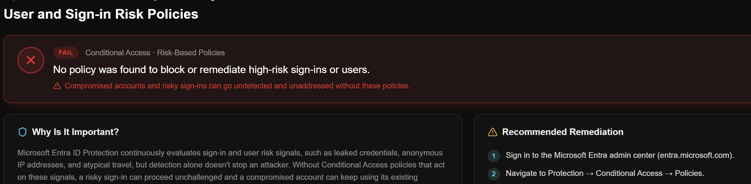 Figure 3. User and Sign-in Risk Policies Configuration in ENow 365 Governance Accelerator
That turns identity governance from another configuration inventory into an actionable part of the organization’s overall Microsoft 365 governance posture.
ENow 365 Governance Accelerator 1.4.0 is designed around a simple shift: Microsoft 365 teams do not need more data without context. They’re already drowning in information spread across reports and admin centers. They need a centralized view of their environment that helps them understand what matters and why, and what to do next.
With ENow, storage waste becomes recoverable capacity with a meaningful budgetary impact. Sharing inventories becomes prioritized exposure. Identity configurations become scored controls with remediation guidance. Licensing data becomes evidence-backed reclamation opportunities.
ENow 365 Governance Accelerator turns fragmented Microsoft 365 data into prioritized, decision-ready insights and defensible next steps, giving IT teams a clearer course of action to reduce risk, control unnecessary costs, strengthen governance, and prepare their environment for AI.
ENow’s founder, Jay Gundotra, started out as an Exchange messaging administrator, so this work is personal. He knows what it feels like to chase every Microsoft release, keep too many plates spinning, and stay a step ahead of both the technology and your users, all while keeping the organization protected and still moving forward. That balance is hard to strike.
For 22 years, ENow has followed the move to Microsoft 365 closely and evolved our products right alongside it, with one aim: to make the complex simple for administrators and Modern Workplace teams. The Community has always been part of that story. It’s why we built the free 365Gov Score with Microsoft MVPs, so any team could benchmark where they stand immediately without a lengthy sales cycle.
We believe better Microsoft 365 governance should be accessible to the teams responsible for delivering it, and you shouldn’t need an enterprise-sized investment to start addressing these challenges.
ENow 365 Governance Accelerator, Standard Edition, is priced so companies of every size can win with it:
ENow's platform provides real, measurable governance to companies of every size, from lean IT teams to the largest enterprises.
IT is usually treated as a cost center, and this is your team’s chance at a clear, measurable win: recovered storage dollars, closed exposure, reclaimed licenses, and a governance foundation ready for Copilot.
The entire Storage Optimization category ships in Standard Edition. Other capabilities mentioned in this release are Professional Edition reports, so request a demo to see exactly what’s included in each edition. You can start with Standard and upgrade to Professional whenever you’re ready to expand your access!
Get your free 365Gov Score for a point-in-time assessment of your Microsoft 365 governance posture and to try Standard free for 7 days.
Want to learn more before trying? Request a demo of ENow 365 Governance Accelerator to see the expanded reporting, prioritization, and remediation capabilities available in Standard and Professional Editions.
*Standard Edition pricing includes processing for up to 20 TB of data and 25,000 users. Organizations with larger tenants can still purchase and use Standard Edition at the pricing listed; processing will stop once either included limit is reached. Additional processing capacity is available for an additional fee.