Microsoft 365 Business Premium vs E SKUs for SMB Security and Savings

Why SMBs Are Rethinking Microsoft 365 Licensing
For many small and mid-sized organizations,...


Microsoft 365 and Azure licensing renewals are among the most high-stakes negotiations that IT and procurement teams face. A poorly timed or unoptimized renewal can lock your organization into three more years of overspend, redundant features, or wasted cloud commitments. While EA terms are typically three years, MCA/CSP commitments and true-up timelines differ. Guidance below applies broadly, with notes where EA/MCA/CSP vary.
On the other hand, organizations that prepare 6–12 months ahead of renewal often save millions while aligning technology investments with business priorities.
This guide outlines practical steps to optimize Microsoft 365 and Azure licensing before renewal. We’ll cover common over-licensing scenarios, tools, and processes for optimization, how to leverage the Azure Hybrid Benefit, strategies for committing to Azure spend, and a real-world example of cutting commitments by 20%.
Many organizations overspend simply by assigning the wrong license tiers. Two common examples stand out:
1. Assigning Microsoft 365 E5 to Everyone
IIT often prefers the “all-in” approach of Microsoft 365 E5. It includes advanced security, analytics, and compliance features without requiring the evaluation of add-ons. But Microsoft 365 licensing shows that E5 for all is rarely the correct answer:
Not all users need E5. Factory workers, front-line staff, and seasonal employees often only require core collaboration features and online versions.
Third-party overlap. Many organizations already invest in solutions like CrowdStrike, Palo Alto, or Okta, resulting in duplicate spend when E5 security features go unused.
In many enterprises, only ~10-20% of users typically need E5. Profiling often supports moving others to Microsoft 365 E3 or Microsoft 365 F3 – or Office 365 equivalents, where appropriate.
For targeted capabilities, E3 +E5 Security/E5 Compliance add-ons can be more cost-effective than full Microsoft 365 E5.
On the other hand, front-line F3 licenses are frequently purchased in bulk but are often under-assigned or left unallocated. Procurement teams often assume that the headcount justifies their purchase, but without regular inventory checks, thousands of licenses can sit unused.
Action step: Run Microsoft 365 Usage/License reports in the Microsoft 365 Admin Center or use third-party optimization tools, such as ENow, to identify inactive accounts and reclaim or reassign those license seats.
Optimizing Microsoft 365 and Azure licensing requires both data-driven tools and cross-team collaboration.
Microsoft Admin Center reports: Useful for identifying inactive users, login frequency, and workload adoption (Teams, OneDrive, Exchange). Data is often high-level or aggregated.
Azure Cost Management: Helps track Azure consumption trends, forecasting, and right-size your commitments.
Third-party optimization tools (e.g., ENow): Provide deeper insights into license utilization, feature adoption, and cross-tenant reporting.
Governance process: Establish a joint IT-Procurement-Security cadence to validate inventories, challenge assumptions with data, and approve right-sizing recommendations.
Graph API/Usage Export: Automate evidence via Microsoft 365 usage exports/Graph reports and Azure Cost Management/Azure exports to standardize decisions quarter-over-quarter.
By combining reporting tools with a structured review process, you’ll uncover unused licenses, redundant tools, and misaligned purchases well before renewal negotiations begin.
One of the most overlooked optimization levers is the Azure Hybrid Benefit (AHB). AHB applies eligible Windows Server and SQL Server licenses with active Software Assurance to Azure compute. Windows Server VM savings are often up to ~40%; SQL savings vary by edition/core mapping.
How it works: When provisioning a VM in Azure, a simple checkbox applies AHB. AHB can be combined with Reserved Instances (RIs) for deeper savings — up to 80% total.
Common issue: IT often skips enabling AHB because they prioritize speed over cost controls. This results in missed savings — often 30–40% per VM — and audit risk if AHB is later incorrectly claimed without entitlement.
Bake AHB checks into image templates, policy/blueprints, and deployment guardrails so it’s enabled by default where eligible.
Key savings opportunity: If you are moving workloads from on-prem to Azure, enabling AHB should be a default step. For eligible migrations, enable AHB to avoid paying Azure compute and separately accounting for on-prem cores covered by SA (within AHB core entitlements).
Build a license + SA inventory tracker that aligns on-prem licenses to Azure VMs. Better yet, include AHB mapping in your EA renewal prep checklist to maximize ROI.
Microsoft offers multiple ways to pay for Azure, each with trade-offs:
Maximum flexibility; It is generally the most expensive option on a per-unit basis, especially for sustained workloads.
Best suited for unpredictable or short-term workloads.
Ideal for spiky dev/test environments, pilot projects, or seasonal loads that you haven’t baselined yet.
Service-specific commitment (e.g., Virtual Machines, SQL Database compute, Cosmos DB).
Offer discounts of up to ~72% compared to PAYG, typically for 3-year VM reservations, sometimes assuming Azure Hybrid Benefit (AHB).
Best for predictable, steady workloads (production VMs, always-on services) .
Risk: overcommitting to capacity or SKUs you don’t fully use.
Commit to a fixed hourly compute spend for 1 or 3 years.
Apply discounts broadly across Azure compute services (VMs, Functions, Container Instances, AKS, App Service).
Deliver up to ~65% savings vs PAYG; more flexible than reservations since you don’t lock in specific VM families or regions; the discount applies across multiple compute services (VMs, containers, etc.) as long as those services are eligible.
Not universal—Savings Plans don’t cover all Azure services (e.g., many data services).
A better fit for organizations with shifting or variable compute needs.
Optimization tip: Before committing, right-size your environment—adjust VM sizes, apply schedules, and deallocate or “park” non-production resources. Then, set a lower, defensible baseline to avoid overcommitting spend.
One global enterprise was preparing to renew its Enterprise Agreement with a $1M annual Azure spending commitment. After running a detailed workload review, they discovered:
By right-sizing workloads, enforcing Azure Hybrid Benefit, and rebalancing commitments (retiring or reassigning underutilized reservations and adding Savings Plans for variable compute), the organization successfully reduced its annual Azure commitment from $1 million to $800,000, a 20% savings while still meeting business needs.
The biggest mistake organizations make is starting optimization too late. By the time Microsoft presents renewal pricing, it’s late to influence your true usage profile. Here’s a sample timeline to give you a better idea of what is involved for the best outcomes.
Begin a full license inventory and usage reviews.
Run optimization pilots (e.g., moving E5 users down to E3 + add-ons).
Lock in validated optimization gains and finalize negotiation strategy
Enter formal discussions with Microsoft or your LSP/CSP, backed by real data.
Plan around Microsoft’s fiscal cadence (June 30 year-end and December half-year) when commercial flexibility can improve. Start by reading our Microsoft EA Renewal Checklist blog.
Optimizing Microsoft 365 and Azure licensing before renewal is one of the fastest ways to cut IT costs without sacrificing productivity or security. Success depends on a proactive, collaborative approach:
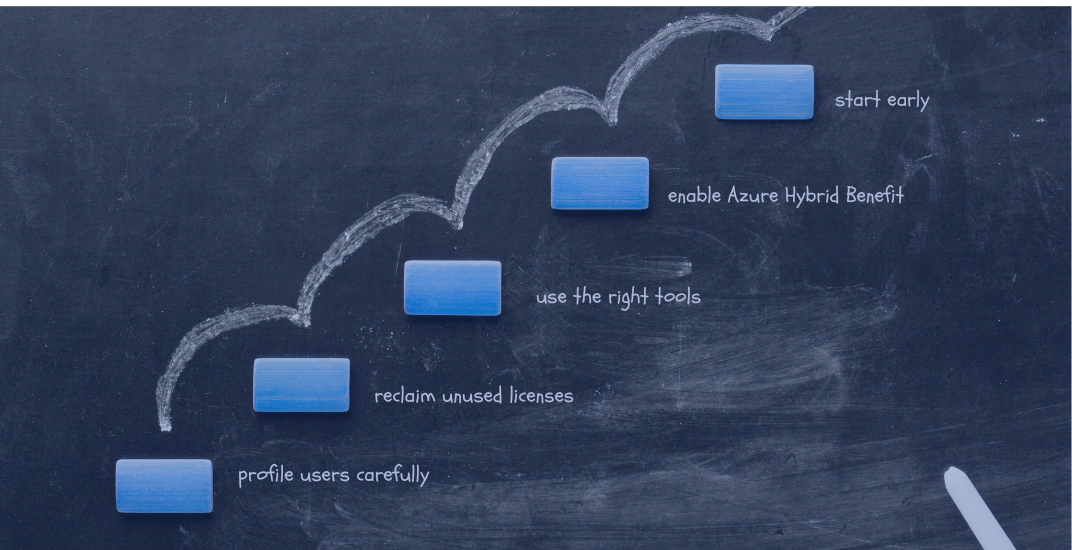
Profile users carefully. Not everyone needs Microsoft 365 E5—use E5 add-ons (Security or Compliance) where targeted capabilities make more sense than full E5.
Reclaim unused licenses. Pay close attention to under-assigned or inactive F3 (Frontline) seats and recycle them.
Use the right tools and processes. Combine Microsoft 365 and Entra ID usage reports with third-party platforms for deeper, cross-tenant insights.
Always enable Azure Hybrid Benefit (AHB). Remember, AHB requires active Software Assurance and proper core entitlements; otherwise, you risk paying twice for the same licenses.
Commit smartly to Azure. Balance PAYG, Reservations, and Savings Plans. Savings Plans cover compute broadly but not all services—combine with Reservations where service-specific discounts are stronger.
Start early. Begin optimization 6–12 months before renewal to build a defensible, data-backed position before pricing hits the table.
By following these steps, IT and procurement teams can present a unified, data-backed case in renewal negotiations, often saving millions while ensuring Microsoft investments align with business strategy.
Don’t wait until Microsoft puts pricing on the table; by then, it’s often too late to optimize. Our team helps IT and procurement teams identify savings opportunities, right-size Microsoft licenses, and negotiate from a position of strength.
👉 Schedule a Microsoft 365 License Optimization Demo today to see how you can save.

Nikki Vijeh has spent the past 15 years helping organizations navigate the complexities of licensing, cloud strategy, and FinOps. She has built and led Microsoft and Cloud Optimization practices, delivering innovative solutions that simplify operations and maximize business value. A proven IT services leader, Nikki has played a pivotal role in forming high-impact technology partnerships and driving sustainable growth. She works closely with partners and enterprise customers to optimize IT investments, negotiate favorable contracts, and align cloud adoption with financial accountability. Her strategic insight, hands-on expertise, and customer-first approach have helped organizations save millions in IT spend while building more efficient and scalable technology.

For many small and mid-sized organizations,...
.png?height=175&name=Microsoft%20EA%20Renewals%20How%20IT%20and%20Procurement%20Can%20Collaborate%20to%20Cut%20Costs%20and%20Avoid%20Over-Licensing%20(1).png)
Renewing a Microsoft Enterprise Agreement (EA) is one of the most significant technology purchasing...